Artifacts
Supporting clarity at every level
Artifacts are the connective tissue between strategy, decision-making, execution, and learning. When done right, they:
- Create alignment across time horizons
- Clarify ownership, intent, and assumptions
- Serve as documentation and dialogue starters
- Support teams in navigating complex systems without chaos
But artifacts aren't static. They're living, purposeful, and vary based on scope, time horizon, and the maturity of the work. Some are used for vision and strategy. Some for execution and learning. And many evolve as ideas move through stages.
The Dotwork Starter Pack supports this layered, multi-resolution approach to artifacts by giving you:
- A consistent vocabulary
- Graph-aware linking across bets, scopes, and metrics
- Time-based framing (1–3 days, 1–3 weeks, 1–3 months, 1–3 quarters, 1–3 years)
- Templates and flexible documentation types
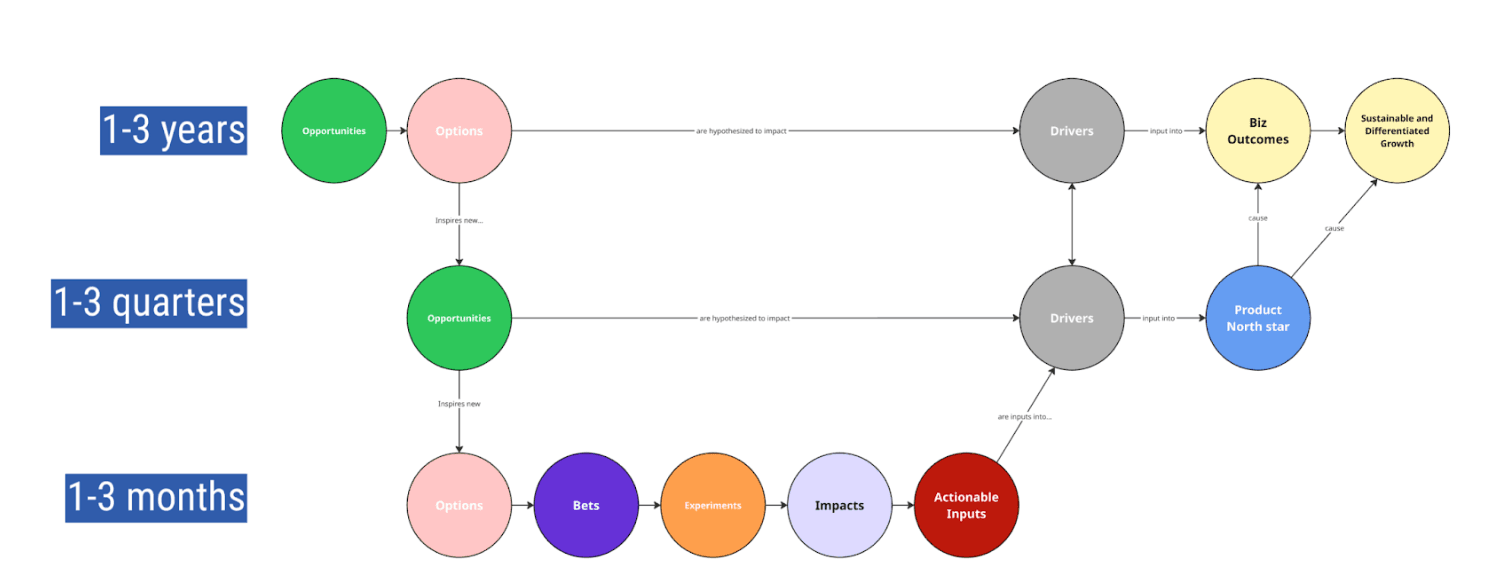
The Multi-Horizon Artifact Landscape
The table below maps out common product and strategy artifacts across time horizons—from 3–10 year vision documents to monthly bet overviews.
Here's what it captures:
- Versioning: Which timeframes these artifacts typically exist within
- Refresh Cadence: How often they are revisited, refined, or rebuilt
- Document Density: High-level, narrative-heavy docs vs. operational trackers or metrics
This map reinforces a key idea: you don't need more documents—you need the right ones, at the right resolution, for the right moment.
Strategic and Vision-Level Artifacts
| Artifact | Purpose | Typical Horizon |
|---|---|---|
| Product Vision | Anchors long-term intent; should rarely change | 3–10y |
| Product Strategy | Defines key choices, strategic posture, constraints | 1–3y |
| Go-To-Market Strategy | Aligns product delivery with market motion | 1–3y, 1–3q |
| Competitive Analysis | Landscape view, updated periodically to inform positioning | 1–3y, 1–3q |
| Market Research Summaries | Condensed market trends and signals, often cyclical | 1–3y, 1–3q |
Planning and Resourcing Artifacts
| Artifact | Purpose | Typical Horizon |
|---|---|---|
| Budget Plans | Cost planning aligned to roadmaps and forecasts | 1–3y, 1–3q |
| Financial Forecasts | Revenue or cost projections tied to plans | 3y, 1–3y, 1–3q |
| Operating Plan / Allocation Plan | Staff/resource deployment across bets | 1–3q |
| Risk Assessments | Surfaced constraints, uncertainties, mitigation options | 1–3q, 1–3m |
Strategy Execution and Planning Artifacts
| Artifact | Purpose | Typical Horizon |
|---|---|---|
| Goals / OKRs | Mid-to-short-term goal setting | 1–3q, 1–3m |
| KPIs / Metrics Dashboards | Business health, product performance | 1–3q, 1–3m, Monthly |
| Product Roadmaps | Sequenced bets, evolving over time | 1–3y, 1–3q, 1–3m |
| Initiative Documentation | Supporting info for current or planned work | 1–3m, 1–3w |
Opportunity and Decision Framing Artifacts
| Artifact | Purpose | Typical Horizon |
|---|---|---|
| Insight Briefs | Short synthesis of key learnings and signals | Ongoing (Monthly+) |
| Opportunity 3–6 Pagers | Full framing of a potential opportunity, includes context, research, scale | 1–3q, 1–3y |
| Investment Proposals (Large) | Major strategic investment logic, approval gates | 1–3y |
| Investment Proposals (Mid-Sized) | Mid-range initiatives or multi-quarter bets | 1–3q |
| RFCs (Requests for Comment) | Collaborative proposals needing wide input | Flexible |
Bet-Level Artifacts (Core Execution Layer)
| Artifact | Purpose | Typical Horizon |
|---|---|---|
| Bet Overviews | Mid-length artifact showing key logic, metrics, scope, assumptions | 1–3m, 1–3q |
| Bet One-Pager | Concise outline of problem, hypothesis, metrics, approach | 1–3m |
| Experiment Canvases | Controlled learning plans tied to hypotheses and metrics | 1–3w, 1–3m |
| Product Requirements Documents (PRD) | Detailed delivery plans, user stories, design specs | 1–3m |
| User Story Maps | Experience-level prioritization across slices of functionality | 1–3w–1–3m |
| JTBD / Job Maps | Anchors the product on user intent and context | Ongoing |
| DHM Hypotheses | Quick triage of desirability, feasibility, and viability | 1–3m |
Knowledge and Supporting Repositories
| Artifact | Purpose | Typical Horizon |
|---|---|---|
| Research Libraries | Collection of qualitative and quantitative research | Ongoing |
| Learning Reviews | Post-bet reflection on what was learned, outcomes | 1–3m |
| Kickoff Decks / Docs | Context and alignment for new initiatives | Start of each bet |
| Working Docs / Whiteboards | Temporary decision support, brainstorms, models | 1–3d–1–3w |
Putting It All Together in Dotwork
Every artifact above can be modeled in Dotwork as either:
- A structured object (e.g., Bet, Roadmap Item, Input Metric)
- A linked document (e.g., external file or embedded write-up)
- A tagged component connected to opportunities, scopes, goals, or teams
Dotwork makes it easy to:
- Link artifacts across time horizons (e.g., a bet one-pager linked to a 3–6 pager opportunity)
- Maintain artifact lineage from insight to bet to impact
- Track versions over time and integrate updates into reviews
- Backlink artifacts to scopes, roles, and rituals
Use graph context to ask questions like:
- "Which bets are targeting this Input?"
- "What insights are informing this strategy?"
- "Which scopes are mentioned in current 3–6 pagers?"
Final Thoughts
Artifacts don't need to be complicated. But they do need to exist—and evolve. Without them, strategy becomes folklore, bets become assumptions, and alignment becomes guesswork. Start simple. Document what matters. And use the Dotwork Starter Pack to weave it all together across your team's real work.
If you're unsure where to start, here's a safe first stack:
- A Bet One-Pager for each roadmap item
- A quarterly update to your Product Roadmap
- One Insight Brief per team every month
- A short kickoff doc and learning review for each major initiative
From there, grow your practice. Let the artifacts reflect your team's thinking—not just what you're doing, but why you're doing it, and what you're learning along the way.